×

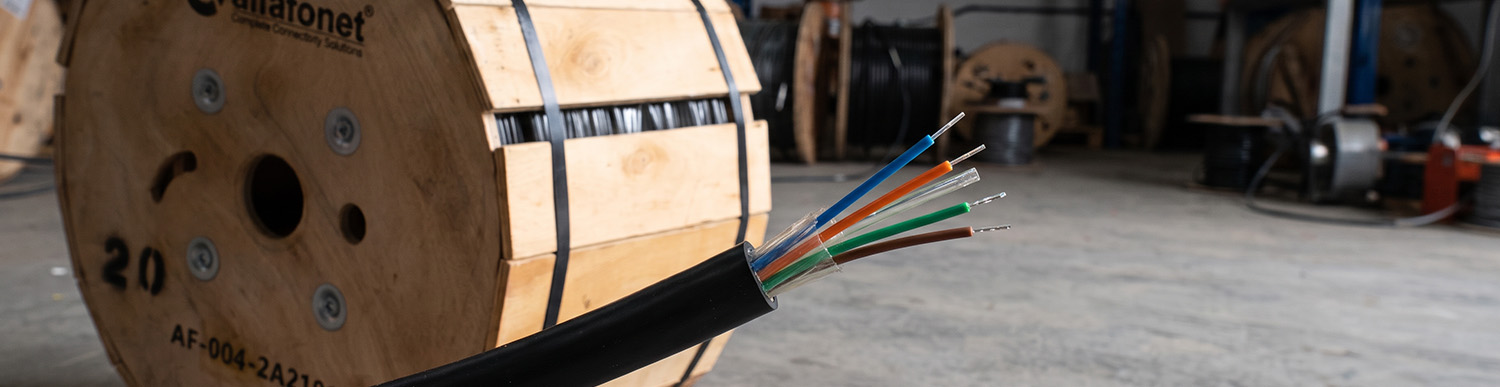
The number of cores in a fibre optic cable should be determined by current connection requirements and potential future capacity needs. A single home may require 1–2 cores, connections between two buildings typically need 8–12 cores, site and campus backbones may require 24–48 cores, while data centre backbones often use 48–96 cores or more. To avoid the cost of installing a new cable in the future, it is recommended to allow at least 25–50% spare capacity.
In this guide, you can learn what fibre core count means, how many cores are required for different applications, how to calculate spare capacity, how to read fibre colour codes and how core count affects cable prices.
Estimated Reading Time: 7 minutes
The number of cores in a fibre optic cable should be selected according to how many connections you need today and how many you may need in the future. In short, 1–2 cores are generally suitable for a single home, 8–12 cores for a connection between two buildings, 24–48 cores for site and campus backbones, and 48–96 cores or more for data centre backbones. In every case, adding at least 25–50% spare capacity to your current requirements is much more cost-effective than installing a new cable a few years later.
Below, you will find an explanation of core count, recommended core counts for different applications, spare capacity calculations, colour codes and the effect of core count on price.
Core count refers to the number of individual fibres inside a cable. A 12-core cable contains 12 independent glass fibres, each capable of carrying a separate light signal. Technically, the word “core” describes the light-carrying centre of an individual fibre. However, in the field and in product names in Türkiye, terms such as “4 core” and “12 core” are commonly used to indicate the number of fibres in a cable. The same specification may also appear in catalogues as “4F”, “12F” or “12 fibres”.
Core count does not determine the speed of a cable. Speed depends on the fibre type (singlemode or multimode), the active equipment used and the transmission distance. Core count only determines how many separate connections can be established through the same cable.
A standard network connection generally uses 2 cores: one for transmitting data and the other for receiving it. Most switches, media converters and SFP modules operate using this duplex, or two-fibre, configuration. BiDi modules, which transmit and receive data over a single fibre, and GPON connections used for fibre-to-the-home services can operate using just 1 core.
The basic calculation is as follows:
Allow 2 cores for each connection operating in duplex mode.
Allow 1 core for each connection operating over a single fibre (BiDi or GPON).
Add any camera, alarm or automation systems that will use separate lines.
Add spare capacity to the total and round up to the next standard core count.
The table below provides initial recommendations for some of the most common installation scenarios. The exact number should be determined according to the number of devices to be connected, operator or project specifications and your future expansion plans.
| Scenario | Typical Requirement | Recommended Core Count | Notes |
|---|---|---|---|
| Home / FTTH (Fibre to the Home) final connection | 1 internet connection | 1–2 cores | GPON operates over a single fibre; a second core provides a spare in case of failure. |
| Apartment / building riser | 1 core per flat | Number of flats + 25–50% spare (e.g. 12 cores for 8 flats, 24 cores for 16 flats) | Check operator and regulatory requirements separately. |
| Residential site / campus (between blocks) | 1–2 duplex connections per block, plus camera and security lines | 12 cores per block, 24–48 cores for the main backbone | A shared backbone with a splice closure may be preferable to running a separate cable to each block. |
| Connection between two buildings | 1 main + 1 spare duplex connection | 8–12 cores | 4 cores may appear sufficient in many cases, but leave little room for expansion. |
| Remote locations within a factory / warehouse | CCTV, PLC and access control | 4–12 cores | Increase the core count if each remote location requires a separate network. |
| Data centre backbone | Multiple duplex and parallel connections | 48–96 cores or more | 40G/100G parallel connections may require 8 fibres per link. |
These figures are intended as a guide. Even within the same building, requirements can vary depending on the number of floors, cameras and network operators.
The general recommendation is to add at least 25%, and preferably 50%, spare capacity to the number of cores you need today. With fibre optic cables, a large part of the overall cost comes not from the cable itself, but from duct excavation, conduit installation, cable pulling and splicing labour. Increasing the core count later means installing a new cable, which involves paying for the same labour again.
Example calculation: You are planning to establish two separate networks between two buildings (an office network and a CCTV network), and both will operate in duplex mode.
1. Active requirement: 2 connections × 2 cores = 4 cores
2. One spare duplex line for each connection: 4 cores
3. Total: 8 cores; the next standard size is 8 cores.
4. If there is a possibility of adding a third system in the future, choose 12 cores.
Even if spare fibres are not being used, they should be terminated at both ends, meaning they should be connected to the patch panel or termination enclosure. This allows you to switch to a spare fibre within minutes if an active fibre is damaged.
Fibre optic cables are generally manufactured in 2, 4, 6, 8, 12, 24, 48, 72 and 96-core configurations. Cables with 144 cores or more are also used in larger projects. In cables with up to 12 cores, the fibres are usually housed in a single loose tube. In cables with higher core counts, the fibres are distributed across multiple tubes in groups of 6, 8 or 12 (multi-loose-tube construction).
The core counts available from stock on our website are:
4-core single loose tube fibre optic cable (2 km reel): suitable for a single connection between two buildings or small-scale CCTV networks.
8-core single loose tube fibre optic cable (2 km reel): suitable for redundant connections between two buildings and small residential sites.
12-core single loose tube fibre optic cable (2 km reel): suitable for connections between blocks, building risers and projects where additional capacity for future expansion is required.
All three cables are singlemode and feature a loose-tube construction suitable for outdoor use. You can compare all available options in the Universal Single Loose Tube Fibre Optic Cables category.
If you need 24, 48 or 96-core cable, or a different cable length, you can send your project details through our contact page to request a quotation.
Fibres are identified using a colour sequence to prevent confusion when working in the field. The commonly used TIA-598 standard specifies the following sequence of 12 colours:
| Fibre No. | Colour | Fibre No. | Colour |
|---|---|---|---|
| 1 | Blue | 7 | Red |
| 2 | Orange | 8 | Black |
| 3 | Green | 9 | Yellow |
| 4 | Brown | 10 | Violet |
| 5 | Grey | 11 | Pink |
| 6 | White | 12 | Aqua |
In cables containing more than 12 fibres, the same sequence is repeated. If the fibres are distributed across multiple tubes, the tubes are also numbered using the same colour sequence. For example, in a 24-core cable, the first tube is blue and the second is orange. Inside each tube, the 12 fibres follow the same sequence: blue, orange, green and so on. If more than 12 fibres are housed in a single tube, fibres 13–24 are distinguished using ring-marked or striped versions of the same colours.
Some manufacturers may use a different colour sequence, such as the DIN/IEC arrangements used in Europe. Always check the colour chart in the cable's technical datasheet before carrying out splicing or termination work.
As the core count increases, the price per metre of the cable also increases. However, the cost per core decreases. In other words, a 12-core cable does not cost three times as much as a 4-core cable.
The prices for the 2 km reels available on our website are as follows:
| Cable | Reel Price (Including VAT) | Price per Metre | Cost per Core (2 km) |
|---|---|---|---|
| 4-core, 2 km | 43,830.00 TL | 21.92 TL | 10,957.50 TL |
| 8-core, 2 km | 56,075.00 TL | 28.04 TL | 7,009.38 TL |
| 12-core, 2 km | 68,320.00 TL | 34.16 TL | 5,693.33 TL |
Prices were taken from the product pages on 11 November 2026. Please check the relevant product page for current prices.
According to the table, moving from 4 cores to 12 cores triples the number of fibres while increasing the reel price by approximately 56%. Therefore, when balancing requirements against budget, choosing the next higher core count is often a more practical option for many projects.
There are also indirect costs associated with core count. Each fibre requires splicing labour, while the splice tray, pigtails and patch panel must have sufficient capacity and ports. We explain the other factors affecting cable prices in our fibre optic cable pricing guide.
The cable's core count must be compatible with the capacity of the splice closure and termination equipment. For example, if 12-core branches are routed from a main backbone to individual blocks, the enclosure at the splice point must be able to accommodate all these fibres. The 48-core underground fibre optic splice closure, with 3 cable entry ports and 4 splice trays, allows splicing of up to 48 fibres and can be used in underground and aerial cable applications. Where a larger number of fibres need to be joined, multiple enclosures or higher-capacity solutions should be planned.
Calculating only for current requirements: The cable may become insufficient when cameras, a second network operator or a new building are added.
Counting a duplex connection as one core: Most switch connections use 2 fibres. Failing to account for this can halve the calculated requirement.
Not terminating spare fibres: Spare fibres with exposed ends cannot be used immediately when a fault occurs.
Mixing fibre types: Even if the core count is correct, the connection will not work if a multimode module is connected to a singlemode cable. Multimode is preferred for short distances inside buildings, while singlemode is generally used for longer distances. For more information, see our article on what fibre optic cables are and how they work.
Core count refers to the number of individual fibres inside a fibre optic cable. A 12-core cable contains 12 independent fibres, each capable of carrying a separate signal.
Two cores are sufficient for a single duplex connection or a home internet subscription. However, this leaves no room for a spare line or additional systems in the future. For connections between buildings, at least 4 cores are recommended, with 8–12 cores being preferable.
Add your current requirements (2 cores for each duplex connection) to 25–50% spare capacity. If the total exceeds 12 cores, choose a 24-core cable. If the total remains below 12, a 12-core cable is generally sufficient.
In a 24-core cable, the fibres are generally distributed across two tubes, each containing 12 fibres. The tubes are blue and orange, while the fibres inside each tube follow the sequence: blue, orange, green, brown, grey, white, red, black, yellow, violet, pink and aqua. Always check the manufacturer's technical datasheet.
No. Core count determines how many separate connections can be established through the same cable. Speed depends on the fibre type, active equipment and transmission distance.
Yes. You can request a quotation through our contact page for 24, 48 or 96-core cables, as well as cables in other lengths.
12.11.2026



Alfafonet Complete Connectivity Solutions © 2026 All Rights Reserved.


0
)
